/Thomas-Logo-Color_Stacked_Registered.png?width=250&height=183&name=Thomas-Logo-Color_Stacked_Registered.png)
Access the Company Profile Manager section of your Thomas Supplier Dashboard to make changes to your company information.
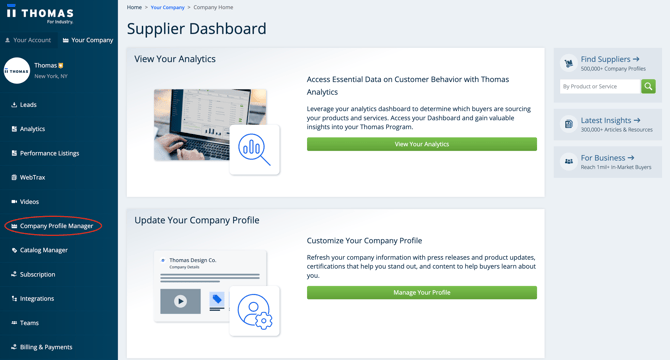
Setting Up Your Profile
- Company Logo
- Custom Company Description
- Upload Content (Images/PDFs/Videos)
- Press Releases
- Certifications / Registrations
- Social Media
Contact Information
Setting Up Your Profile
Company Logo
Adding your company logo -- make sure it's up to date if you've recently gone through a brand update -- promotes brand awareness and helps your company stand out in Thomasnet.com categories.
Custom Company Description
Thomas provides a company description for every supplier, but we also allow you to add your own unique description. Use this area to showcase company history, value propositions, key products or capabilities, distinguishing certifications, and other assets.
Upload Content (Images/PDFs/Videos)
Don’t just tell visitors about your expertise — show them. Draw visitors’ eyes with images and videos of your products, equipment, production processes, and more.
Press Releases
Purchasing new equipment or releasing a new product? Make sure to highlight it with a press release — this release not only publishes on your profile, but also gets published to Thomas Insights for enhanced visibility.
Certifications / Registrations
Thomasnet.com users are looking for high quality solutions and are often sourcing for very specific suppliers who meet stringent certification requirements. Make sure you show them which quality standards your company is certified in by selecting certifications from our extensive list.
Social Media
Make it easy for buyers to connect with and follow your brands after their search — sync up your LinkedIn, YouTube, and Facebook profiles with Thomasnet.com.
Contact Information
Verify Your Email Address In Client Center
Verifying your email address ensures you’ll receive all RFIs that buyers submit while viewing your profile.
Thomas WebTrax
Thomas WebTrax provides activity reporting to help you see which companies are visiting your website and your Thomasnet.com profile. Need to get setup with Thomas WebTrax? Click here.