/Thomas-Logo-Color_Stacked_Registered.png?width=250&height=183&name=Thomas-Logo-Color_Stacked_Registered.png)
Access your Performance Dashboard in your Thomas Supplier Account on the "My Company" tab.
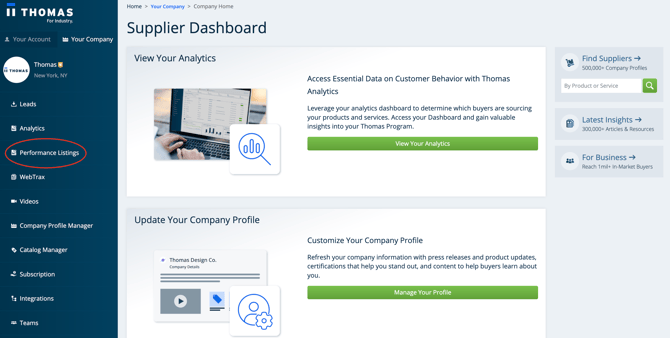
View this video walkthrough for a guided tour through your Performance Dashboard.
Performance Dashboard Definitions
Note: The default time period for your Performance Listings Dashboard is the Past 90 Days. You may change the time period view by toggling the dropdown menu.
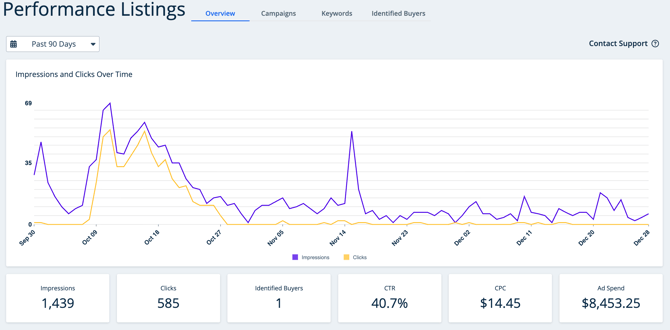
Impressions
An impression is counted when at least 50% of your sponsored listing is visible on a user’s screen.
Clicks
Referred to as "evaluation clicks," these are the total count of unique users who have clicked on your sponsored listing.
Identified Buyers
The number of identifiable unique companies where at least one employee has clicked your sponsored listing. View names of identified companies that clicked on your sponsored listing on the Identified Buyers tab. This list will give your Sales team direction on outreach to make to target companies.
CTR - Click-Through Rate
Click-Through-Rate (CTR) shows the percentage of users who viewed your sponsored listing and clicked it.
CPC - Cost Per Click
Cost-Per-Click (CPC) is the average amount paid for each unique click on your sponsored listing.
Ad Spend
The total cost of your advertising campaign(s) for the selected date range.
Campaign Details
Click into your campaign overview to see the campaigns you have active at any given time and the keywords they include.