/Thomas-Logo-Color_Stacked_Registered.png?width=250&height=183&name=Thomas-Logo-Color_Stacked_Registered.png)
(New to Thomas? Create your account now!)
Your Thomas Account
The "Your Account" tab enhances the Thomas Buyer Experience and is included in the Supplier Experience as well. Buyers can browse recently created shortlists, recent searches, submitted Requests for Information (RFIs), and more.
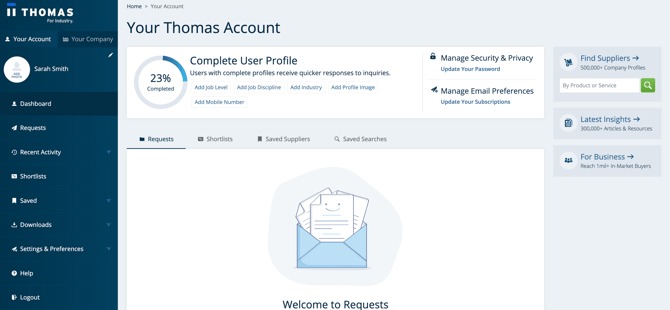
Side Panel Navigation
Quick links to the tools that are most important to you and your company:
Requests
Requests enable you to request quotes from multiple claimed suppliers at once. If you receive a quote that you like, you can checkout with that quote from within the platform.
Recent Activity
Need to go back to that last search or supplier? Access recent past searches and recently viewed suppliers to jump back into your sourcing journey.
Shortlists
On this page, you can easily edit and manage all of your shortlists, in addition to contacting suppliers and requesting supplier summary reports.
Saved Searches and Saved Suppliers
Save search criteria for future searches, and view all of your saved suppliers. If you’re further along in your sourcing journey, you can also add companies to a shortlist or contact them directly within the tool.
Downloads
We understand the effort that goes into your supplier research, which is why we offer free supplier summary reports and in-depth, expert-written white papers to help inform your buying experience. As an added bonus, all downloaded these documents are kept in your Thomas Account for reference.
Settings & Preferences
Completing your account and keeping it up to date helps us recommend and serve you the most relevant and timely content for your company and career. Under your Thomas Account settings and preferences section, you can personalize your user profile, update your password, and manage your email subscriptions. (Please note you cannot change your account email for the time being, but we are working on updating this soon!)
Your Supplier Account Dashboard
The "Your Company" tab enhances the Thomas Supplier Experience, giving you access to your Supplier Dashboard and analytics tools. Watch this 3-minute overview for a tour of your Supplier Dashboard.
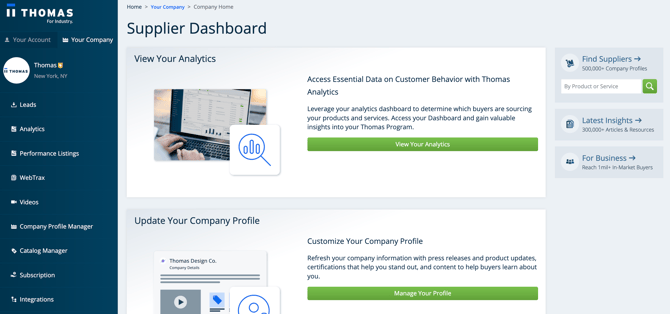
Side Panel Navigation
The side panel provides quick links to the information that’s most important to you and your company:
Leads Inbox
This consolidated leads inbox contains leads from Phone Calls, White Papers, and website visits and is your go-to inbox evaluating incoming leads. Quickly qualify leads with a rating of 1-5 on incoming RFIs here in your Leads Inbox.
Analytics
View your Supplier Analytics Dashboard to evaluate clicks, views, and other intent data. Click here for more information.
Performance Listings
View evaluation clicks, identified buyers, and other key metrics to help you evaluate how your Performance-Based Listings campaigns are working. Click here for a video walkthrough of your Performance Listings Dashboard and here for Performance-Based Listings FAQs.
WebTrax
Evaluate the activity happening on your website and get actionable data to engage in-market buyers with Thomas WebTrax.
Videos
Get insight into how your videos are performing advertising program is performing with this video metrics dashboard.
Company Profile Manager
Make updates to your company profile; add content like white papers, videos, and certifications. Click here for more information.
Catalog Manager
Access this online product management platform to manage your product catalog and product data.
Subscription
Review and modify your program details through this link.
Billing & Payments
Access our online payment system for billing information, to make a payment, or set up monthly Auto Pay. Click here for more information.
Teams
Administer your companies’ accounts, invite team members and designate roles and associated permissions. Click here for more information.